ThinWorld Citrix Knowledgebase

Tuesday, 9 February 2010

MFCOM Script to detect CAG Access

I wanted a script to detect if a users connection was made through CAG (Citrix Access Gateway)

I required this as i wanted to save users default printer only when the connection was made in the office. This is to prevent users saving their home printer information into their profiles.

We use a hybrid profile solution managed by Appsense Environment Manager. Using the following script as a custom rule in Appsense we could tell Appsense to NOT SAVE the default printer for any connections made through the CAG.


Script
'Name of Filter scan expected to pass
ExpectedFilter = "xxx_CWI_Policy"

'Get Server Name
Set objNTInfo = CreateObject("WinNTSystemInfo")
ServerName = lcase(objNTInfo.ComputerName)

Result = 0

'Create MetaFrame Session Object
Set MFSession = Createobject("MetaFrameCOM.MetaFrameSession")

'Initialize the session object with our data
MFSession.Initialize 6, ServerName ,"",-1

'Iterate through the session filters for this session

For Each x in MFSession.SmartAccessFilters
msgbox x
' return true if our filter is found
If x = ExpectedFilter Then
Result = 1
End If
Next
'Return result of script
If Result = 0 Then
'Rule will pass
WScript.Quit 0
Else
'Rule will fail
WScript.Quit 1
End If

Labels:

Tuesday, 2 February 2010

Publishing a HTA file in XenApp (citrix)

If you wish to directly publish a HTA application in XenApp (Citrix) Then you need to point at the MSHTA.EXE file and pass it the HTA name. Directly publishing the HTA does not work.

eg.

"C:\windows\system32\WSHta.exe" "MyCode.hta"

Thursday, 28 January 2010

XenApp Citrix Copy and Paste Problems

Ive often had problems with copy and Paste between my ICA delivered applications and also my RDP connections to server desktops. Users report the same issue as well and a logoff and log back on normally sorts it all out. Ive also tried the Repair chain ulities available but with no luck. I came across this registry tweak for v10 or newer ICA clients that may help. Ive just added it to my machine and will monitor to see if i see an improvement.

See the following article for full details
http://support.citrix.com/article/ctx112434

Default Web Browser Registry Keys

To change the Default Web Browser setting for a machine via the registry you need to modify the following registry key areas. I got these keys from a RegMon on my Windows XP workstation but it should be the same for Windows 2003 Server.

HKLM\Software\Classes\HTTPS\Shell\Open
HKLM\Software\Classes\HTTP\Shell
HKLM\Software\Classes\FTP
HKLM\Software\Classes\HTTP\.XHTML
HKLM\Software\Classes\HTTP\.XHT
HKLM\Software\Classes\HTTP\.SHTML
HKLM\Software\Classes\HTTP\.HTML
HKLM\Software\Classes\HTTP\.HTM

CMC or XenApp Advanced Configuration Loader fails to Launch after Upgrade

After applying an upgrade or patch to your XenApp servers the CMC or XenApp Advanced Configuration Loader fails to start with the error

The Presentation Server Console could not be started because there was an error creating the process. Would you like the details.


Ive seen this problem on XenApp 4.0 to XenApp 4.5 upgrades and now again after installing HRP05 for XenApp 4.5
The problem is due to Java requirements. Pressing the YES to the error message will give you more of a clue.

XenApp 4.0 Resolution
The CMC for PS4 appears to be hardcoded to look for key
HKEY_LOCAL_MACHINE\SOFTWARE\JavaSoft\Java Runtime Environment\1.4\JavaHome

Put this old entry back but point the Java Home key to location of the currently installed java (eg. C:\Program Files\Java\jre1.5.0_09)

This fix is discussed on older version of the CMC that had the same type of problem in article CTX102338

XenApp 4.5 HRP05 Resolution
After HRP05 upgrade the newer CMC with stupid name requires at least Java 6. Installing this corrects the launch problem.

Wednesday, 27 January 2010

Web Interface Single Signon

If you want single sign on for web interface where the users AD credentials are pushed through to the web interface page then you need to install the full version of the Client and set the following registry keys on your clients

[HKEY_LOCAL_MACHINE\SOFTWARE\Policies\Citrix\ICA Client\Engine\Lockdown Profiles\All Regions\Lockdown\Logon\Local Credentials]
"SSOnUserSetting"="true"
"EnableSSOnThruICAFile"="true"
"UseLocalUserAndPassword"="true"
"SSOnCredentialType"="Any,NT,NDS"

Tuesday, 26 January 2010

Support GUI HTA

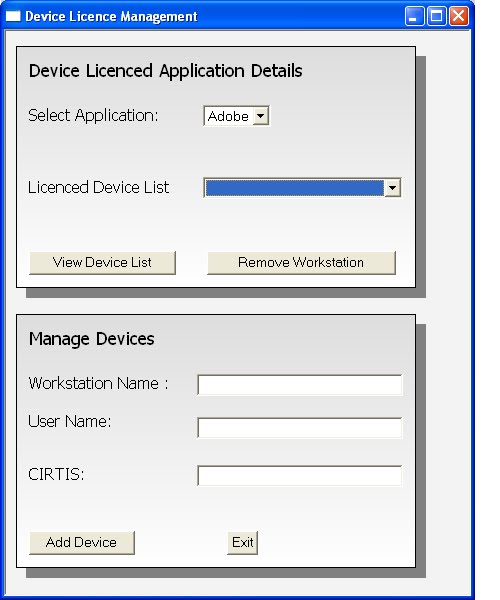
I wrote this support GUI for my employer. It allows 1st line support to perform a number of quick support actions from a simple GUI Interface. The code is HTA so HTML and VB Script together.

We use a hybrid profile system so the GUI allows the deletion of portions of the profile at the click of a button. (Eg. Delete Printer settings, Delete IE settings)

The program also records it own useage so that trends spotting can be performed.

The code is fairly specific to my current environment so will be of limited use to others , however some of the code may be handy so im posting the whole thing.


Screenshot


SupportGUI2.hta

Labels:

Monday, 25 January 2010

XenServer Build from USB Stick

I saw this interesting post in the citrix blogs , a guide to installing XenServer via a bootable USB stick. I plan to use this method to update my XenServer from v4 to v5 very soon as my Little shuttle XPC has no CD drive. I will post back if i have any problems with the method detailed in this link

http://community.citrix.com/display/ocb/2010/01/17/Install+XenServer+from+USB+Drive

Tuesday, 5 January 2010

64 Bit Terminal Server Shadow Key

64 Bit windows has a 64 bit area for the shadow keys.

HKLM\Software\Wow6432Node\Microsoft\Windows NT\CurrentVersion\Terminal Server\Install\Software

This area works in the same way the old 32 bit versions does. Eg. When in Change User \Install mode HKCU registry key changes are written to this area.

I only noticed a 64 bit version after a small drama where users reported an admin account name in their MS Word username field.
Investigation showed that an admin user had launched MS Word while building a server. The Server for reasons still unclear was still in install mode (deployment failure possibly) and as such the Admins account Name went into the shadow key. When the server went live new users picked up the Admins account name in their Word Username field.

Wednesday, 30 December 2009

HTA Displaying a ADO Security Warning Message

Ive been writing a HTA recently to act as a support GUI for my employer.
I will post all its code in another blog once its completed.

I had an annoying pop up message which was slowing down my testing.

ADO Security Warning
This website uses a data provider that may be unsafe. If you trust the website, Click OK, Otherwise click Cancel

This occured because i was running the HTA from a network drive,the message did not display if i ran the HTA locally on my PC.

The following Internet Explorer restriction is causing the pop up message
Miscellaneous: Access data sources across domains
This security popup can be prevented by setting the following registry key
HKEY_CURRENT_USER\Software\Microsoft\Windows\CurrentVersion\Internet Settings\Zones\1

Change 1406 to value 0 - To Prevent the message

Note : A Great article for details on IE Explorer Security Zone settings in the registry
is the MS Article http://support.microsoft.com/kb/182569